 Ann Catherine Jose
  George Chiramattel
 This post explains the spectrum of options available to build systems that use LLMs and agents.
These patterns form a useful progression, but they are not a strict maturity ladder. A system can combine them and move along different dimensions independently.
The overview below maps the eight patterns before we examine the architectural choices behind each one.
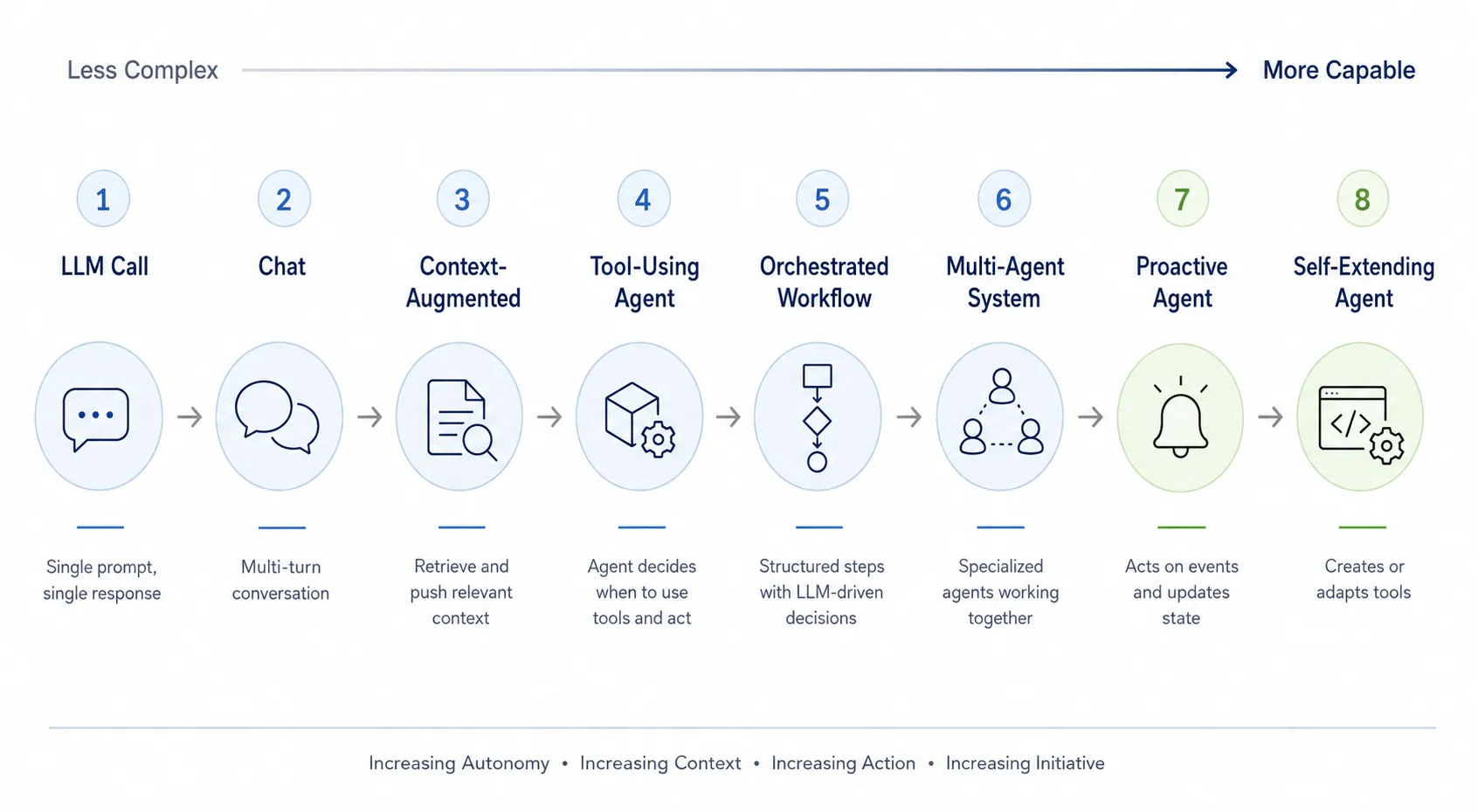
Let’s start with the simplest pattern, a single LLM call, and progressively add conversation history, external knowledge, tool use, workflows, multiple agents, and proactive behavior.
1. LLM call
Given input, produce output. This is the simplest use of an LLM. You send a prompt to the model and it sends back a response. There is no memory, no tools, no external data access, and no real notion of an ongoing task. The response is also unstructured unless you explicitly ask for a format or enforce a schema.
Example:
Prompt: Classify this support request as billing, technical, or account: “I was charged twice for my subscription.”
LLM: Billing
Characteristics: The application controls everything. The LLM is just a function call: input text in, output text out. It does not know what happened before unless you include that information in the prompt.
This pattern works well for summarization, rewriting, classification, extraction, translation, simple Q&A, and generating structured text.
The key limitation is that the model only sees what you send in that one request.
2. Chat
Chat means multiple LLM calls with conversation history. It is still mostly a sequence of LLM calls, but now the application includes previous user and assistant messages as context.
Example:
User: Draft a short reply telling a customer that their refund was approved.
Assistant: Your refund has been approved. The funds will be returned to your original payment method.
User: Make it warmer and mention that the refund may take five to seven business days.
Assistant: Good news, your refund has been approved. You should see the funds on your original payment method within five to seven business days.
Examples include Claude and ChatGPT.
The model appears conversational because each new request includes prior turns. Technically, the model is not remembering anything on its own. The chat application is replaying relevant conversation history into the context window.
In reality, if you turn on personalization, these chatbots can store memory about you. Future chats feel more personal because the system prompt includes details from that memory. For example, it might remember that I am in the Bay Area and that I am a developer.
Characteristics: The LLM can answer follow-up questions, maintain tone, refine earlier answers, and respond based on prior messages. The application still controls the loop: user says something, app sends context to model, model replies.
The key limitation is that conversation history may grow too large, so the app has to truncate, summarize, or select which past messages to include.
3. Context-augmented LLM
Push relevant knowledge into the prompt. This is where RAG (Retrieval Augmented Generation), search, and retrieval enter the picture. Instead of relying only on the model’s trained knowledge or chat history, the application finds relevant external information and inserts it into the prompt. This extends what the model can answer with current, private, or domain-specific knowledge.
Example:
User: What does our refund policy say about annual plans?
Behind the scenes, the application searches the company documents and retrieves the relevant policy.
Context supplied to the model: “New annual subscriptions may be refunded within 14 days of purchase. Renewals are non-refundable once processed.”
Assistant: New annual subscriptions are eligible for a refund within 14 days. Processed renewals are not refundable.
Characteristics: The LLM still does not go get information or context by itself. The surrounding application retrieves the context and pushes it into the model. The model’s job is to read, reason, summarize, compare, or explain based on supplied material.
This works well for company knowledge bases, documentation assistants, legal or policy Q&A, customer support, personal email search, and codebase Q&A.
The important shift from chat is:
- Chat provides context from conversation.
- RAG and search provide context from external knowledge.
The key limitation is that the retrieval system must find the right context. If retrieval fails, the LLM may answer from incomplete or irrelevant information.
4. Tool-using agent
The LLM chooses when to pull context or take action. This represents a fundamental transition in architecture. Rather than having application logic pre-determine every piece of information to retrieve, the model decides when and how to use specific tools.
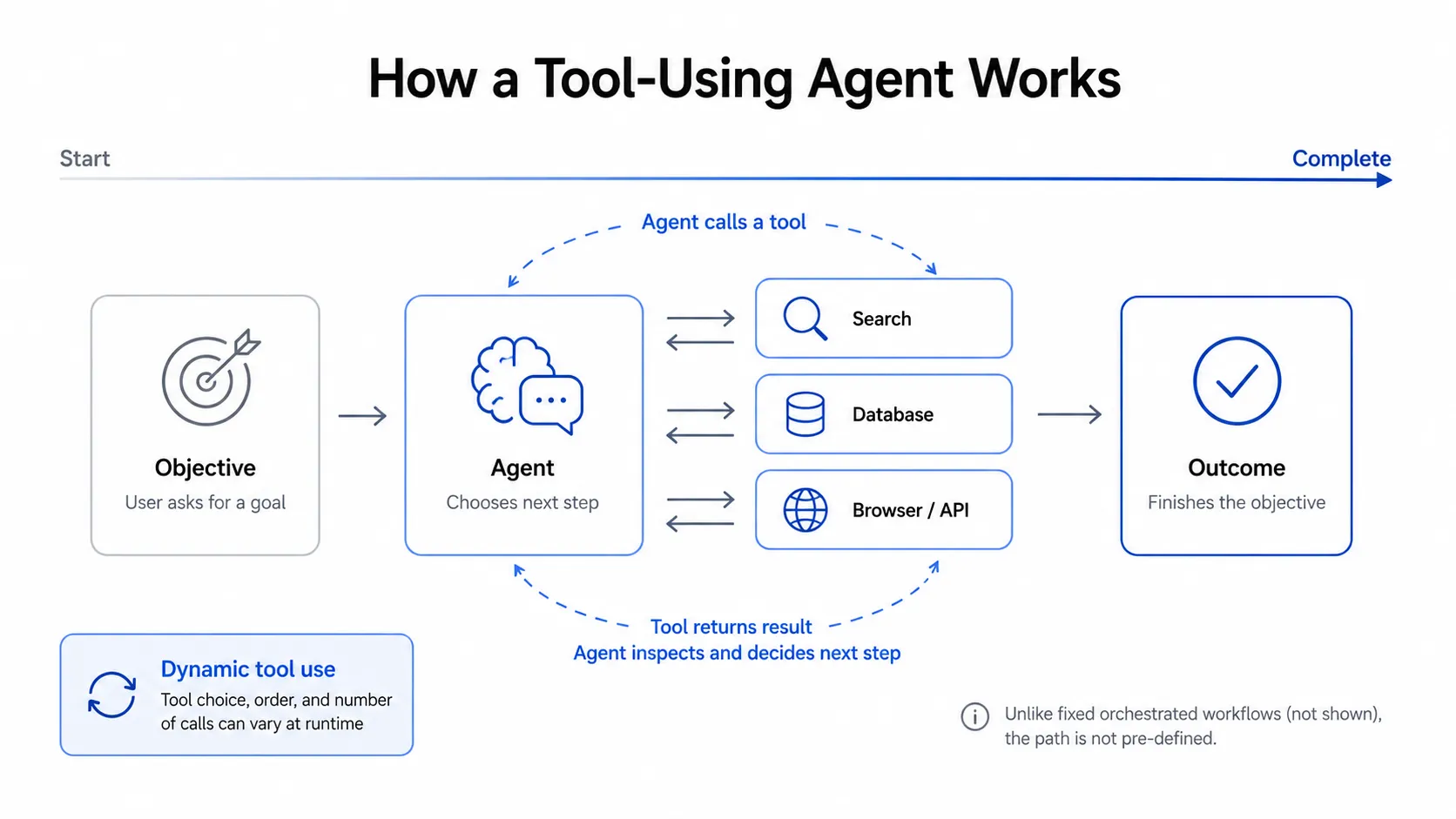
Implementing this requires a model with tool-calling capabilities. Developers provide a system prompt that documents the available tools, including descriptions, argument schemas, and expected response formats. When processing a prompt, the model decides whether a tool can help. If so, it returns a structured tool-call response.
The hosting application or harness intercepts that tool call and executes the corresponding function, such as searchEmail(), using the model’s arguments. Once the tool output returns to the model, the LLM decides whether it needs more tool calls or has enough context to produce a final answer.
Example:
User: Find the latest invoice from Acme and summarize what changed from the previous one.
The agent searches the user’s email, opens the two latest Acme invoices, and compares them.
Agent: The latest invoice is $1,250, which is $200 more than the previous one. Hosting increased from $800 to $1,000, while the $250 support charge stayed the same.
Here the LLM is not just answering. It is deciding intermediate steps.
Characteristics: The agent can call tools such as search, database queries, web browsing, email lookup, calendar access, code execution, ticket creation, file reading, or API calls.
The agent operates in a loop:
- Observe user request.
- Think about next action.
- Call a tool.
- Observe the result.
- Decide the next action.
- Repeat until it has enough context.
- Produce a final answer.
The key difference from RAG is:
- RAG: application retrieves context and gives it to the model.
- Agent: model decides what context or action it needs next.
The key limitation is reliability. The more freedom the model has, the more you need guardrails, permissions, tracing, retries, and validation. Memento follows this pattern. When you ask a question, it performs agentic search to create context by using available tools such as vector search and social-graph navigation.
5. Orchestrated workflow
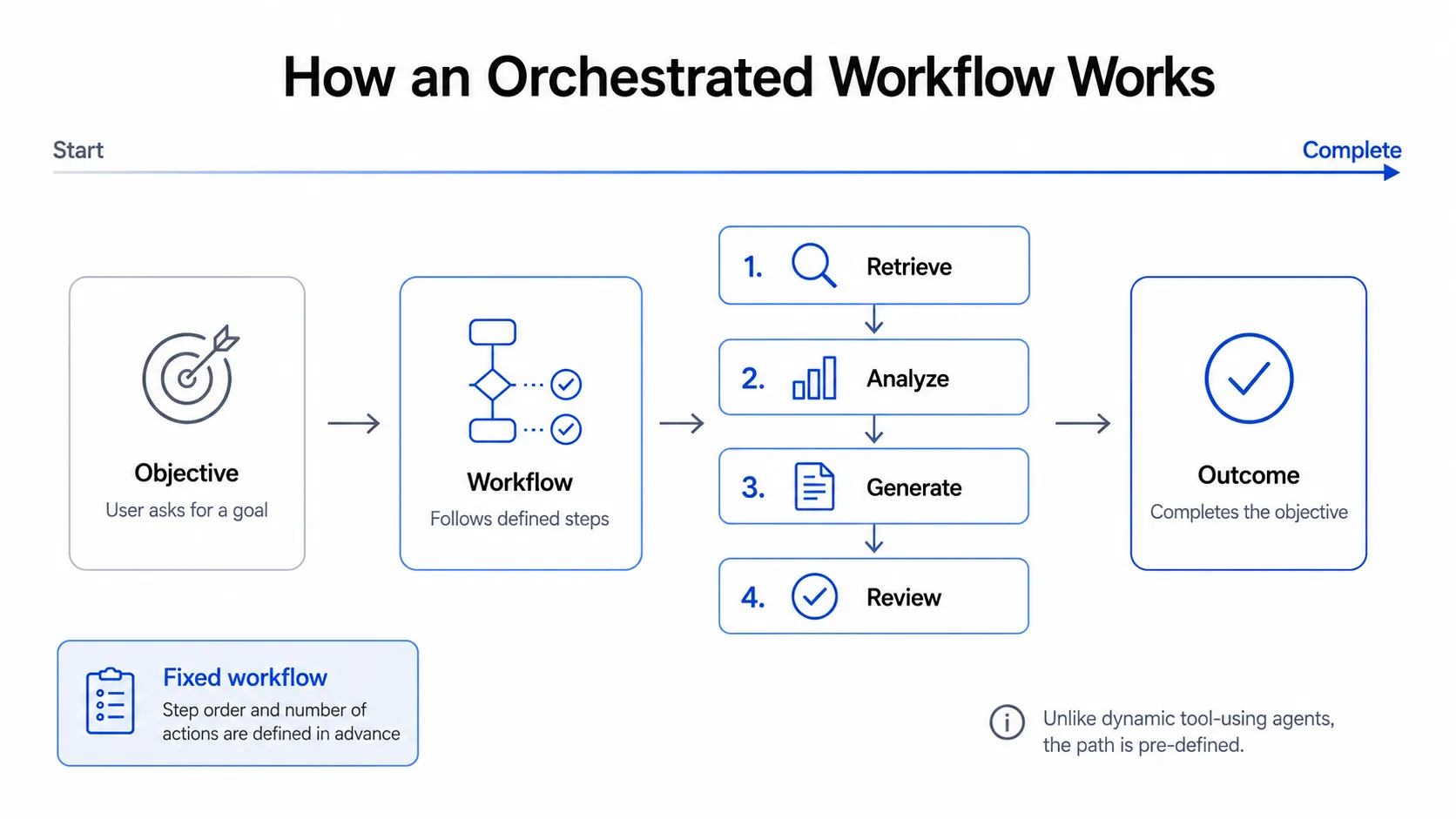
This is a controlled agentic process. Many useful agents in production are not fully open-ended. They are deterministic workflows with some LLM-driven decisions inside them.
Example:
Customer support triage workflow:
- Classify the incoming ticket.
- Retrieve relevant customer history.
- Retrieve policy documents.
- Draft a response.
- Check the response for policy compliance.
- Send it to a human for approval.
The LLM may perform individual steps, but the overall process is orchestrated by the application.
Characteristics: This is more predictable than a free-form agent. The system designer defines the stages, allowed tools, failure paths, and approval points. The LLM has freedom within boundaries.
This is useful for business processes: support automation, sales research, onboarding, document review, data cleanup, recruiting workflows, and internal operations.
The key shift is from an agent deciding everything dynamically to a system defining the workflow while the LLM handles judgment-heavy steps. This is often the practical middle ground for real applications. We can also define hybrid systems that mix agentic steps with deterministic workflow steps.
6. Multi-agent system
Specialized agents collaborate. A multi-agent system uses multiple agents, often with different roles, tools, or responsibilities.
Example:
Research agent: gathers information.
Critic agent: checks assumptions and gaps.
Writer agent: drafts the article.
Editor agent: improves clarity and tone.
Orchestrator: decides when each agent runs.
Another example:
Software development system:
- Product agent writes requirements.
- Architect agent proposes a design.
- Coding agent edits files.
- Test agent runs tests.
- Review agent comments on risks.
Characteristics: Each agent may have its own prompt, tools, memory, and specialization. The orchestrator coordinates them.
This can improve modularity, but it also adds complexity. Agents can duplicate work, disagree, hallucinate, or pass bad assumptions to each other. The key design question is whether multiple agents are truly needed, or whether one agent with a structured workflow would be simpler.
Multi-agent systems are not automatically more intelligent. They help when a task can be partitioned into specialized roles that require different context, tools, or evaluation criteria. They can also help manage models with restricted context windows: each sub-agent gets its own context, and a final response can be synthesized from individual outputs.
7. Proactive agent
The agent acts when something happens. This is different from a normal chat agent because the user does not have to start every interaction. The agent is event-driven.
The trigger can come from outside:
- New email arrives.
- Calendar event changes.
- GitHub issue is opened.
- Customer churn risk increases.
- Database value crosses a threshold.
- A scheduled time arrives.
- A document is updated.
- A payment fails.
Example:
When a new customer support email arrives:
- Agent reads the email.
- Looks up the customer account.
- Checks recent tickets.
- Drafts a reply.
- Escalates if sentiment is negative or account value is high.
Another example:
When a new email from an old contact arrives:
- Agent retrieves prior relationship context.
- Summarizes the history.
- Suggests a thoughtful reply.
Characteristics: The agent is connected to system state and external events. It may update records, create tasks, notify users, or trigger workflows.
The major shift is:
- Reactive: user asks, agent responds.
- Proactive: environment changes, agent responds.
This pattern requires careful attention to permissions and trust. A proactive agent should usually distinguish between suggesting an action, preparing an action, and taking an action automatically. For example, drafting an email is lower risk than sending it.
8. Self-extending agent
The agent can create or modify its own tools. In this pattern, it can go beyond the supplied tools by generating helper scripts, APIs, workflows, or adapters to solve a task more effectively.
Example:
User: Analyze all CSV exports in this folder and create a recurring report.
The agent inspects the files, writes and runs a Python script to normalize them, and saves a reusable report-generation tool.
Agent: I analyzed the exports and created the report. I also saved the reporting tool so it can run again on a schedule.
Another example:
Agent notices that it repeatedly queries the same API. It writes a small wrapper tool:
get_customer_payment_history(customer_id).
Characteristics: The agent gains a form of adaptability. It can build new capabilities out of lower-level primitives.
But this is also where risk rises sharply. A self-extending agent needs strong sandboxing, code review, permission boundaries, versioning, audit logs, and rollback mechanisms. OpenClaw and Hermes fall in this category.
The key shift is:
- Tool-using agent: uses tools given to it.
- Self-extending agent: creates new tools or modifies tools given to it.
This pattern is powerful, but should usually be constrained. In most real systems, the agent may propose tools, but a human or trusted deployment pipeline approves them.
Autonomy spectrum at a glance
The eight patterns compare as follows:
| # | Pattern | Who decides the next step? | Where does the context come from? |
|---|---|---|---|
| 1 | LLM call | Application | Prompt only |
| 2 | Chat | User/application | Conversation history |
| 3 | RAG/search | Application | Retrieved external context |
| 4 | Tool-using agent | LLM | Tools, APIs, search, files |
| 5 | Orchestrated workflow | Application + LLM | Controlled workflow context |
| 6 | Multi-agent system | Orchestrator + agents | Multiple specialized contexts |
| 7 | Proactive agent | Events + policy | External events + system state |
| 8 | Self-extending agent | Agent, within limits | Existing tools + generated tools |
The deeper pattern
Consider a customer-support assistant. It can be designed in very different ways.
One version might read the customer’s full account history, search company policies, and decide what information it needs. It can prepare a draft, but a support representative must start the work and approve the response.
Another version might see only the ticket category and follow a fixed workflow. It has fewer decisions to make, but it can send a standard response automatically whenever a matching ticket arrives.
The comparison reveals four choices in an agent’s design: what information it can use, which steps it can choose, what actions it can take, and what causes it to start. We call these context, control, action, and trigger.
These choices are independent. An agent can have broad context while requiring approval for every action. Another can act automatically within a narrow workflow using limited information.
Because each choice can be made separately, a system should grant only what the task requires. This leads to our first principle:
Principle #1: Minimum sufficient autonomy
Give the model only the authority it needs to achieve the desired outcome.
A decision test for autonomy
Before adding autonomy, ask four questions:
- Does the model need to choose the next step, or can the application define it?
- Does the model need to change external state, or is a recommendation enough?
- Must the system act without a user request?
- Must the model create or modify capabilities beyond the tools it was given?
Each yes answer introduces a concrete requirement. Add the corresponding authority and safeguards, then stop when the system can reliably achieve the desired outcome.
Conclusion
For many products, a simple LLM call or RAG pipeline is better than an agent because it is faster, cheaper, easier to test, and more predictable.
The goal is not to use the most agentic architecture possible. It is to use the minimum amount of autonomy needed for the job.
This is the first of four posts on building agentic systems. Read the others: Abstraction Layers, Ownership Boundaries, and Learning Loop.